TrillMark app iconTrillMark

Know instantly which app notified you.

macOS plays one alert sound for everything, and only lets you switch it off app by app.

TrillMark gives each app its own sound and a colored flash labeled with its name — so you can tell a work message from a security-camera alert without stopping to look.

One-time purchase · up to 3 Macs · Apple silicon · macOS 26+

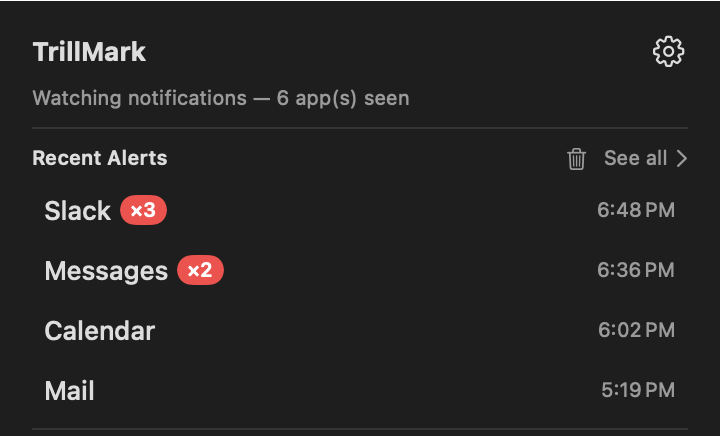
TrillMark's menu-bar panel titled Recent Alerts: Slack notified three times at 6:48, Messages twice at 6:36, then Calendar at 6:02 and Mail at 5:19 — each app named, newest first.

Open the menu-bar panel and your recent alerts are right there — each app named, newest first, with a count when one notified more than once.

See which app — in the color you chose

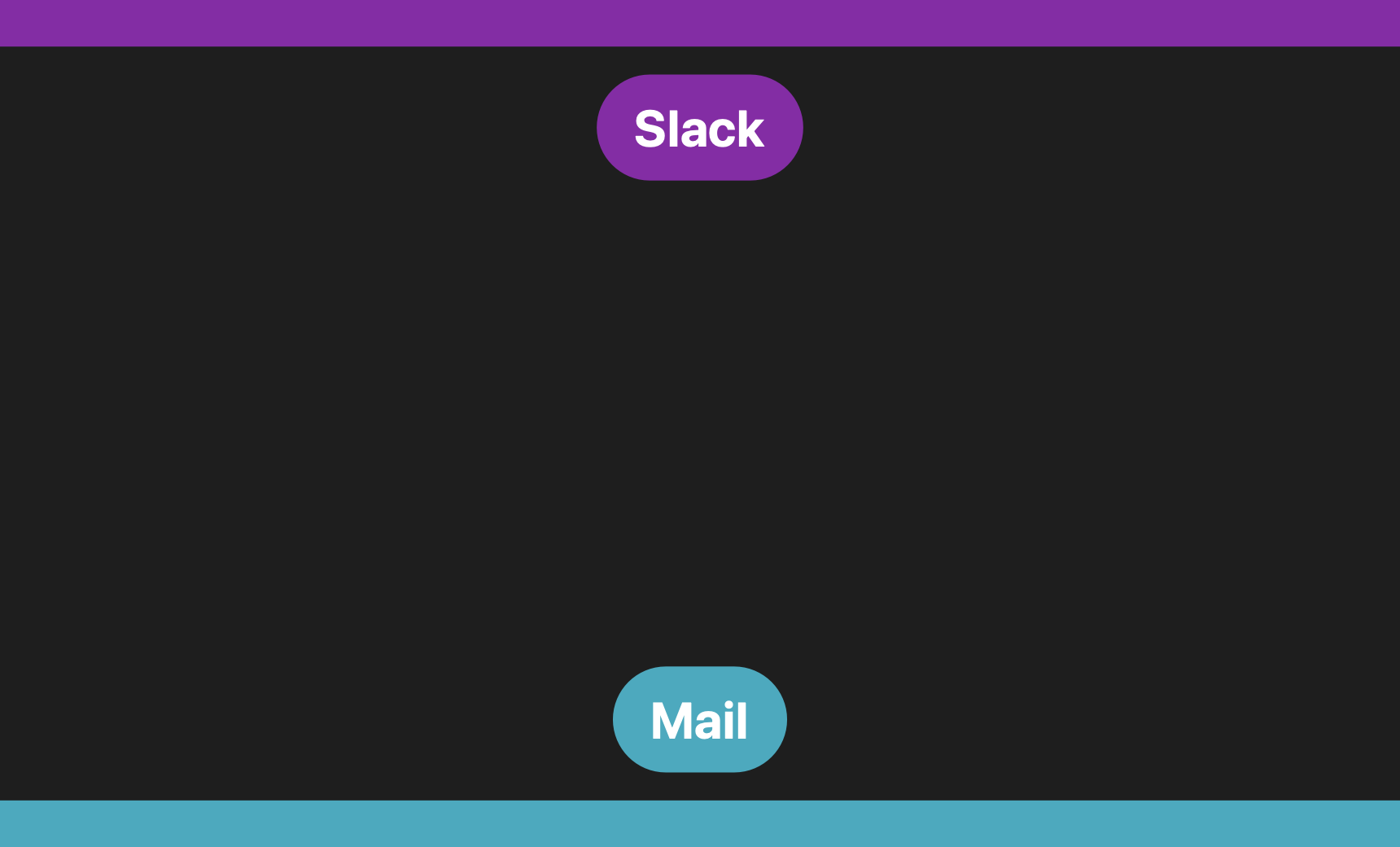
Give each app a color. When it notifies you, TrillMark flashes that color on screen with the app's name — a full-screen wash, or a quiet band along the edge. When two apps ping at once, you see two colors and know each one.

A full-screen purple wash with the word Slack in the middle
A full-screen wash
A teal band around the edge of the screen with a Mail pill in the center
Or just the screen's edge
Two alerts at the same time: a purple band along the top edge labeled Slack, and a teal band along the bottom edge labeled Mail — each app in its own color
Two at once, still clear

Made to be seen, not just heard

TrillMark works completely without sound. Every app's alert can appear as a flash in its color with its name on screen — a full-screen wash or a quiet band at the edge — so you always know who it is, in total silence. It's built for Deaf and hard-of-hearing users first, and just as helpful when your headphones are in or the room has to stay quiet.

You choose how bright each flash is and how long it lasts, with a gentle, no-strobe option if you're sensitive to flashing light. And TrillMark keeps a short, private list of the alerts it showed, so a flash you looked away from is never lost.

Set it up once, then read your alerts at a glance

Give the apps that matter their own sound and their own color, and let everything else stay quiet.

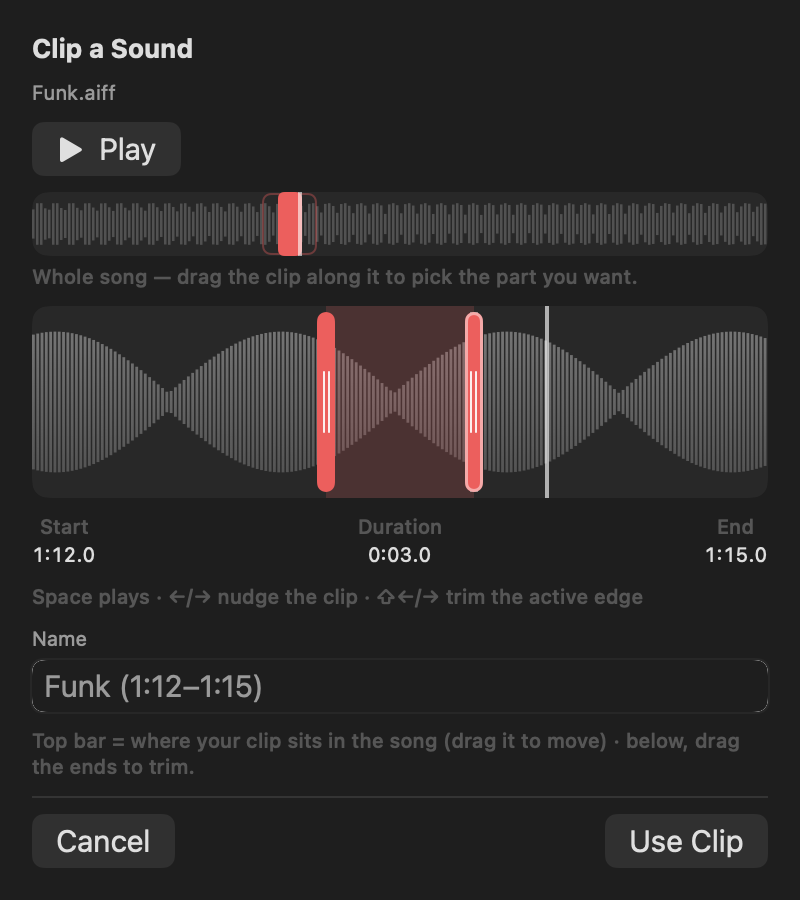
TrillMark's clip editor: a waveform of a song with a three-second region selected to save as a notification sound

Use any sound you want

Assign one of the built-in macOS sounds, one of the 24 tones included with TrillMark, or your own.

Import an audio file, or clip a few seconds out of a song you own without leaving the app — drag the region along the waveform, listen, and save it as a notification sound.

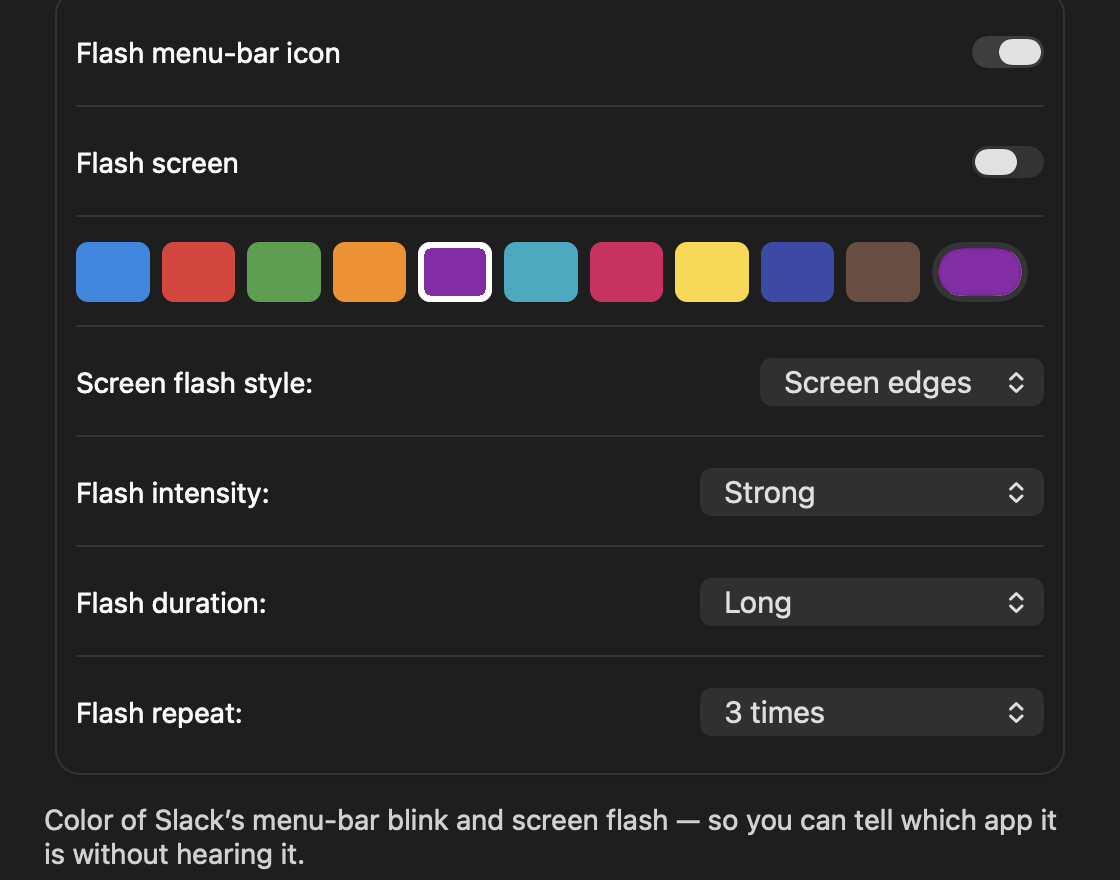
Per-app flash settings in TrillMark: a row of colors to choose from, then menus for the flash style, intensity, duration and repeat

Pick the color, and how it flashes

Give each app a color, then choose whether it washes the whole screen or just outlines the edge — TrillMark shows the app's name either way.

Set how strong the flash is, how long it lasts, and how many times it repeats, per app, with a gentle option for anyone sensitive to flashing light.

The small stuff, too

A sound for every app

One of the built-in macOS sounds, one of the 24 tones that come with TrillMark, or your own — a soft tone for chat, an alarm for on-call, silence for the rest.

Rules that read the notification

Play a sound only when the title or body contains a word you choose, or matches a pattern. One app can have several rules.

See what you missed

TrillMark keeps a short local list of the alerts it showed, newest first, so a flash you looked away from isn't lost.

Start in one click

Add a popular app and it gets a distinctive sound to start from, so you can tell it apart right away and fine-tune it later.

Mute or snooze from anywhere

Silence everything with a keyboard shortcut, or snooze for a set time — from a Shortcut or Siri too.

Louder than the system max

Boost an important sound above 100%, up to 200%, so it cuts through music or a call when it really matters.

Works with any app

Slack, Discord, Teams, Gmail, Outlook, Mail, Messages, Calendar, Zoom, Notion, Chrome, PagerDuty — anything that shows a banner.

Light on your Mac

It watches more closely when you're active and idles down when you're not, so it stays responsive without draining the battery.

Native & notarizedBuilt in AppKit, Developer ID–signed and Apple-notarized. No SIP changes, nothing to disable.
100% on your MacNo accounts, no analytics, no trackers. It reads notifications on-device and never sends them anywhere.
One-time purchaseBuy it once and own it, on up to 3 of your Macs. Not a subscription.
Only asks for AccessibilityThe one permission it needs to see banners. No Screen Recording, camera, or mic.

One Low Price. One Time Only. Yours Forever.

$7.99$14.99

Launch price · up to 3 Macs · free updates

Buy Now

14-day money-back guarantee. If you're not satisfied for any reason, you get a full refund. No questions asked.

Like every skjapps utility, TrillMark is built to do one useful thing well and then stay out of the way, so it feels like a normal part of macOS rather than one more thing to manage.

Questions

Will I hear two sounds at once?

macOS plays each app's own notification sound at delivery, and no app can silence another's. So TrillMark's first-run setup walks you through muting the native sound for the apps you're customizing — one checkbox each in Notification settings — so you hear only the sound you chose. The banner still appears, and TrillMark still reacts.

I'm deaf or hard of hearing — can I use it without sound?

Yes. Every rule can show a visual cue instead of a sound, or alongside one: a flash of the menu-bar icon, a band along the screen edge, or a full-screen wash, each in a color you assign to the app and labeled with the app's name so you know which one it is. You can set how bright and how long the flash is, including a gentle, slow option if you're sensitive to flashing light. TrillMark also keeps a short local list of the alerts it showed, so a flash you looked away from isn't lost.

Why does it need Accessibility?

There's no public API to observe other apps' notifications, so TrillMark reads Notification Center's banners through the macOS Accessibility API. It's the only way to know which app notified you. It reads a notification's text on your Mac, only to decide how to react, and never sends it anywhere.

Is it on the Mac App Store?

No. Reading notification banners isn't allowed inside the App Store sandbox, so TrillMark ships as a direct download — Developer ID–signed and Apple-notarized, with automatic updates via Sparkle.

What does it collect?

Nothing leaves your Mac — no accounts, no analytics, no trackers. It goes online only to check for updates (optional, with a first-run prompt) and, once licensing is live, to validate your license key. See the Privacy Policy.

Does it work with Focus?

Yes — you can add TrillMark to a macOS Focus as a Focus Filter, so it changes behavior when that Focus is on. And when a Focus or Do Not Disturb suppresses a banner, there's nothing for TrillMark to react to.

What do I need to run it?

A Mac with Apple silicon running macOS 26+.

Can I get a refund?

Yes. Email [email protected] within 14 days of your purchase and you'll get a full refund, no questions asked. See the Refund Policy for details.
Still have a question?

Something broken, or have an idea? Email me. I build these apps solo, use them daily, and read every message.

[email protected]